How I Use PARA
Tiago Forte introduces the idea of PARA in his book Building a Second Brain.
It’s a simple approach to setting up a top level hierarchy for the things you care about. After some initial skepticism I warmed to the idea. I think it’s a a great framework but I don’t see a lot of examples of how people really use it for their systems. So this is me doing that.
PARA is ordered by how frequently you’ll need to access the information. It’s also just enough guidance to be a nice frame to think about all the information you care about. Going below the top level seems to fall into place.
To learn more about PARA check out this video How to Organize Your Digital Life in Seconds (PARA Method) | Part 1 or of course buy the book.
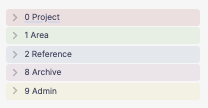
Here’s a summary of what PARA stands for.
| name | description |
|---|---|
| Project | Something you’re driving to completion, it probably has an end date |
| Area | Your areas of responsibility, think of your roles |
| Reference | Information you’d like to keep around and might need later |
| Archive | Things you don’t think you need anymore |
Reference / Resources
Tiago calls it Resources but Reference sings to me a bit more so I renamed it for myself.
Notes
I use Obsidian for my notes. If you have a favorite that is not Obsidian I’ve probably used it. Obsidian has the right mix of features for me. VI key-mapping, great use of Markdown, I own my data, rich plug-in community and the ability to customize most anything you’d want.
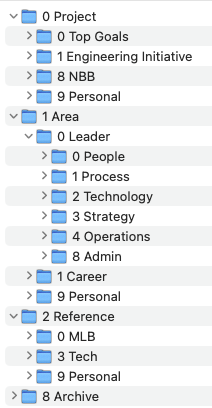
Here’s a pretty picture of what it looks like. Tiago recommends using numbers in front of the directories to get the right ordering. My notes are where I mostly interact with and think about PARA so in this section I’ll dive into all the PARA things in this section but how I apply PARA applies to Getting Things Done and File System.
Projects you’re currently working on
├── 0 Project
│   ├── 0 Top Goals
│   ├── 1 Engineering Initiative
│   ├── 9 Personal
│   └── Inception
At work we have Top Goals those are the main things we’re working on over the year. These are important and I access them often. We also have things that our stakeholders are less concerned about and are driven by us, those are Engineering Initiatives. Then I have personal projects. It might be stuff around the house, things related to a hobby, recreation or travel.
If it has a goal, a defined end state and it’ll be done within a year then it’s probably a Project.
Area of responsibility
This is where you think about the different roles you are responsible for, what are your obligations to the world that don’t fit in a Project. If something doesn’t have an end date but you’re in charge of it then it probably belongs here.
It’s a good chance to introspect about what it is you do here.
├── 1 Area
│   ├── 0 Leader
│   │   ├── 0 People
│   │   ├── 1 Process
│   │   ├── 2 Technology
│   │   ├── 3 Strategy
│   │   ├── 4 Operations
│   │   └── 8 Admin
│   ├── 1 Career
│   └── 9 Personal
│       ├── 0 Religion
│       ├── 1 Family
│       ├── 2 Health
│       ├── 3 Reading
│       ├── 4 Writing
│       ├── 5 Hobbies
│       ├── 6 Sharpen the Saw
│       └── 9 Protector
Reference that might be useful
This keeps around information that doesn’t have a completion date, isn’t exactly tied into an area you’re responsible for but you still want to have notes for it. Like you might be interested in notes about your car but your car isn’t inherently related to a specific area of responsibility you have or a project you’re doing.
Here’s a smattering of things I have in Reference.
- An inventory of your computers, their specs and what OS you’re running on them
- Vendors you deal with at work
- Notes about your cars, when you got them, when you service them
- Notes about medical visits
- I’m a fan of collecting Mental Models so every time I come across a new one I add it
├── 2 Reference
│   ├── 0 MLB
│   ├── 1 Mental Models
│   ├── 3 Tech
│   └── 9 Personal
│       ├── 1 Family
│       ├── 2 Health
│       ├── 3 Reading & Writing
│       ├── 4 Finances
│       ├── 5 Preparation
│       ├── 6 Recreation
│       ├── 7 Things
│       ├── 8 Friend
│       └── 9 Important Documents
List of Mental Models
What’s that? You are dying to know what mental models I have in my notes? I got you.
1 Mental Models.md 1-3-1 Method.md 2nd Order Thinking.md 70% rule.md Abilene Paradox.md Ad hominem.md Brooks’s Law.md Chesterson’s Fence.md Clean Room.md Cloward-Piven Strategy.md Cobra Effect.md Confirmation Bias.md Conway’s Law.md Cunningham’s Law.md Dead Sea Effect.md Dunning-Kruger Effect.md Eisenhower Matrix.md Endowment Effect.md Gall’s Law.md Goodhart’s Law.md Halo Effect.md Hanlon’s Razor.md Hemmingway Bridge.md Innovation token.md Inversion.md Jevons paradox.md Kaizen.md Oblique Strategies.md Observer Effect.md Occam’s Razor.md Paradox of Success.md Persian Messenger Syndrome.md Peter Principle.md Price’s Law.md Prospect Theory.md Pyrrhic Victory.md Reversible decisions.md SCAMPER.md Segal’s Law.md Separate decision from implementation.md Solomon’s Paradox.md Space Travel Dilemma.md Steel Man.md Strangler Pattern.md Strategic Intent.md Straw man.md Streetlight Effect.md Sturgeon’s Law.md Survivorship bias.md Theory of Constraints.md UNODIR.md Wabi-Sabi.md Wait - Walk Dilemma.md
Archive of things you don’t care about anymore
If you’re unable to suppress your inner hoarder you can avoid anxiety by just putting things in Archive. You could just dump things in here without structure but at the end of every year I cull my notes for things I don’t care about anymore. All those Projects, Areas and Reference priorities have shifted. I just toss it into the year I last stopped caring about it.
├── 8 Archive
│   ├── 2019
│   ├── 2020
│   ├── 2021
│   ├── 2022
│   ├── 2023
│   └── 2024
Admin things for running my notes
This isn’t a PARA thing but I have an Admin folder for things that help me run Obsidian.
The 9 Admin/Daily/YYYY directories are managed by the Calendar plugin. Each day gets a note and I configured the plugin to put things there.
When I’m trying out new plugins in Obsidian I like to create a note to safely try it out. I don’t want to just do this in an existing note so I have a Plugin Sandbox directory. It acts as a little reminder for what the plugin actually does.
I have templates for new daily notes and other things mapped to keyboard commands.
Assets holds all images, PDFs and other attachments I reference from notes.
└── 9 Admin
    ├── Daily
    │   ├── 2022
    │   ├── 2023
    │   ├── 2024
    │   └── 2025
    ├── Plugin Sandbox
    ├── Templates
    └── assets
Getting Things Done
I use OmniFocus for Getting Things Done. I’ve dabbled in other tools but I’ve used this for a very long time and it just works well for me.
Tiago recommends that you echo PARA everywhere you find yourself needing a hierarchy for your information and things you work on. To me Projects and Area are the only things that apply to GTD. GTD isn’t a holder of Reference information and I don’t have an Archive.
This makes me sad but under my OmniFocus Projects I have Project and Area as my top level structure. It pretty much maps to what I have in Obsidian.
I don’t see OmniFocus tags mapping to PARA so I don’t make an effort to create a hierarchy that matches.
File System
Same deal, this should be very similar to my Obsidian file structure. I don’t engage with my file system much but it’s nice to be oriented to this structure so you know where to find or put things.
Documents go here if they’re too big and kind of dumb to put in my notes. Maybe it’s big PDF manual for a camera. Things like contracts you want to keep around, taxes, mortgage documents, copies of birth certificates.